Your client asks for a time report. You spend the afternoon on it.
A client emails on Tuesday afternoon. "Can you send me a breakdown of hours on the rebrand so far?"
Simple request. You have been tracking the project for six weeks. The data exists somewhere. You tell them you will have it by end of day.
By 5pm, you have opened three spreadsheets, two project tools, and a Slack thread from four weeks ago. You manually reconcile time entries from different formats. You correct two entries logged to the wrong project code. You rebuild a summary that still does not match last month's totals.
The report took three hours and forty minutes to produce. It covers 80 hours of delivered work. The client read it in 45 seconds.
This is not a reporting problem. It is a data structure problem.
Agencies with 5 to 15 active clients spend an average of 6 to 10 hours per month per account manager compiling reports by hand. At $50 per hour for a senior account manager, that is $3,000 to $6,000 a month in internal cost that never appears on any invoice. For most agencies, client reporting overhead ranks just below salaries as the largest time drain on their operations team.
Why the report takes so long
The issue is not how long the report itself takes to write. The issue is where the data lives before you start building it.
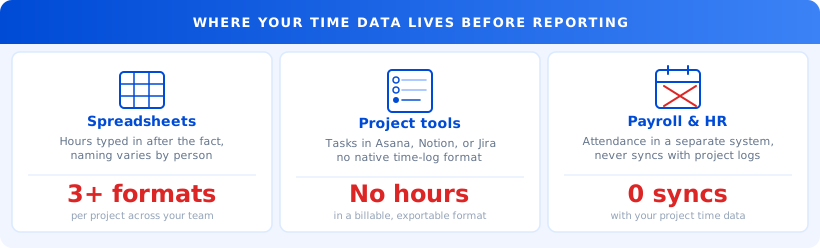
Most agency teams log time in at least three separate places. A project management tool tracks tasks. A spreadsheet captures hours, if anyone gets around to logging them. A payroll or HR system holds attendance records. None of them share a data format. None of them talk to each other.
When a client asks for a time breakdown, you are not pressing "export." You are doing archaeology.
You pull hours from one tool. You cross-reference against tasks from a second. You check whether the logged hours match any activity data you have from a third. Then you format all of it into something a client can read without a tutorial.
Each step is a place where errors compound. A team member logs to the wrong project in week three and your totals are off by 8 hours. Someone misses two days of entries and the numbers do not reconcile. You send the report. The client spots an inconsistency. You spend another hour explaining it.
Important
If your team uses more than one tool to track project time, expect to spend 30 to 90 minutes per client reconciling data before writing a single word of the actual report.
What the report actually needs to contain
Most client time reports are either overloaded with raw data or too summary-level to be useful.
A good client time report contains exactly four things:
- Total hours logged against the project in the reporting period
- A breakdown by person or role
- A breakdown by task or phase
- Any hours flagged as non-billable or over-scope, with a brief note
That is it. Nothing else.
If your time data is structured correctly from the start, this report should take under five minutes to generate. You filter by project, select the date range, group by task, and export. The data is already segmented because the system required structure at the moment of entry.
The reason it takes four hours is that the data was not structured at entry. It was logged however each person felt like logging it, on whichever day they remembered to do it.
What structured time data actually looks like
Structured time data means every entry has four fields that never vary:
- Which client project?
- Which phase or task within that project?
- Who logged it?
- When and for how long?
When those four fields are filled in consistently, the report is already built by the time you ask for it. You filter by client, pick the date range, and export. The data is already segmented by task and person because that is how it was required at entry.
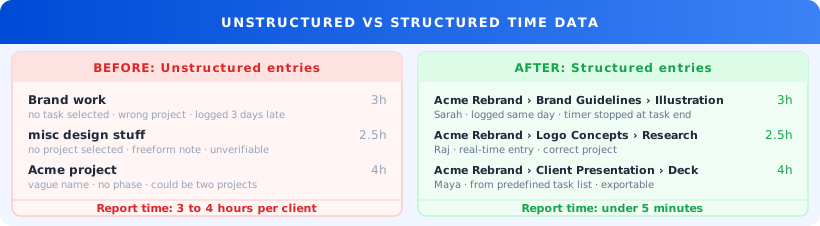
The discipline gap here is not your team's fault. If the tool makes it easier to type "general design work" than to navigate to "Acme rebrand > brand guidelines > illustration," your team will take the faster path. Not because they are careless. Because the faster path is right in front of them.
A good time tracking setup removes friction from structured entry, not from entry in general. Requiring a project and task selection before a timer starts adds two seconds at the beginning of a task. It saves three hours at the end of the month.
Trakkar's time tracking requires project and task selection before any entry is created. This is not a restriction. It is what makes the data reporting-ready by default, without a cleanup pass afterward. The reports and analytics module then lets you filter by client, group by task, and export in one step, with no manual formatting.
For agencies managing multiple retainers, this difference is tangible. A Friday afternoon spent building five client reports from scratch becomes a Friday morning with 45 minutes of review and a full afternoon free.
What one agency found in 90 days
Amara manages operations for a content and design agency in Bengaluru with 11 people and 9 active retainers. Every month she produced a time summary for each client: hours by phase, by person. She was spending 12 to 14 hours a month on this task.
Not because the work was complex. Because her team logged time into a shared Google Sheet, and each person used slightly different names for the same tasks. "Brand refresh" and "rebrand phase 1" were the same project. "Client call" and "retainer check-in" were the same activity. Nobody knew that when reading the data.
"I was not spending 12 hours on reporting. I was spending 12 hours cleaning up data that should never have been dirty in the first place."
She standardized two things. First, every project in Trakkar was created with a predefined task list before work started. Second, the rule became: no entry gets logged to a task that does not already exist in the project. No freeform names. No improvised categories.
Month one took some adjustment. Month two, the team had the habit. By month three, her client reporting took 50 minutes instead of 12 hours.
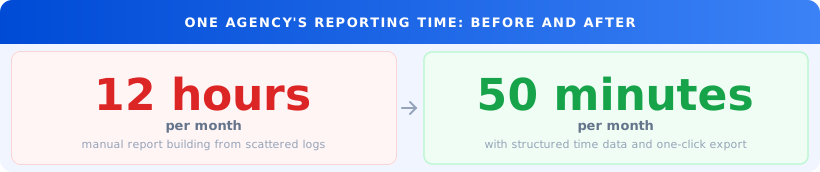
The work had not changed. The structure of the incoming data had. The hours she recovered went back into client work and project planning rather than spreadsheets.
What to do this week
You do not need a full system overhaul to start seeing results. Here are five steps you can complete before next Friday.
Day 1: Map where your time data lives. List every tool your team uses to log hours, even informally. Spreadsheets, Slack threads, project tools, sticky notes. You cannot consolidate what you have not named.
Day 2: Run one project audit. Pick your most recent completed project. Pull every time entry. Count how many used inconsistent task names, how many went to the wrong project, and how many are missing entirely. The number will be higher than you expect.
Day 3: Build a standard task template. If you run similar projects for multiple clients, they share 6 to 8 phases in common. Build that template once in Trakkar's task and project management tools. Every new project copies it. No improvised names.
Day 4: Run one week of structured logging. Pick one active project. Require that every hour maps to a task in the template. Not "misc work." A specific task. Review it on Friday.
Day 5: Time yourself generating the report. Pull the client report for that one project at the end of the week. Note how long it takes with clean data compared to your current average. Multiply that delta by 12. That is your annual reporting overhead.
Tip
Start with one project, not your full client list. A single structured project audit takes 30 minutes and gives you a concrete number for the team. Doing everything at once usually stalls by week two.
Stop spending your afternoons on reports
If a client asking for a time breakdown costs you three hours, the problem is not the client. It is the structure of the data sitting behind the report.
The work is already done. The hours are already logged somewhere. The only question is whether they are organized in a way that produces a readable report in five minutes or in an afternoon.
See how Trakkar's reporting works for agencies, or book a 20-minute demo. In the first ten minutes, we will show you what your current time data looks like and how long it would take to produce a client-ready report today.
If that number is more than 30 minutes per client, the fix is closer than you think.