You sent the invoice. You know the hours are right. Then the message arrives.
"Hey, 32 hours seems high for this sprint. Can you break it down?"
That question is not really about the hours. It is about proof. The client is not calling you a liar. They just cannot see what you did, and your invoice gives them nothing to look at except a number.
Freelancers running three or more retainers face this an average of two to four times per year. Each dispute takes 45 to 90 minutes to resolve, if it resolves cleanly. Many end in a discount offered to preserve the relationship. At a billing rate of $60 per hour, a 10% write-down on a disputed $3,000 invoice costs you $300 and an hour of your time.
Do that three times a year and you have just paid for a time-tracking tool twice over, in losses.
Why the dispute happens in the first place
The client is not wrong to ask. They are paying for work they cannot see. Development, design, strategy: none of it leaves a visible footprint the way laying bricks does.
When your invoice says "UX design work: 32 hours" and nothing else, the client has no anchor. Thirty-two hours of what? On what days? For which parts of the project?
The dispute is not a trust problem. It is an information problem.
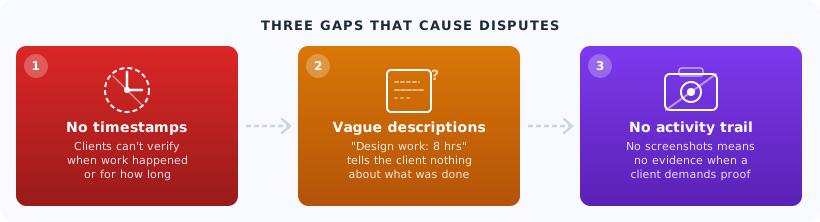
There are three specific things missing from most disputed invoices.
No timestamps. "Week of April 14" tells the client nothing. "Monday April 14, 9:00am to 11:20am: wireframes for dashboard flow" is a different document entirely.
Vague task descriptions. "Development work" does not distinguish between your three-hour debugging session and your 20-minute config change. Clients cannot evaluate what they cannot see.
No activity trail. For certain clients, especially agencies billing their own end clients downstream, they need more than your word. They need something they can point to.
The math on three disputes per year
Sit with this for a moment.
You are a freelancer billing an average of $5,000 per month across four retainers. You run into three invoice disputes over the year. Each one costs you:
- 90 minutes of back-and-forth explanation
- A 10% write-down on the disputed invoice to keep the client
- The mental overhead of reconstructing what you did two weeks ago from memory
At $65 per hour, 90 minutes is worth $97.50 in lost billable time. The 10% write-down on a $3,000 invoice is $300. Per dispute, you are losing close to $400 and an afternoon of productive work.
Three disputes a year: $1,200 in direct write-downs. Plus the time. Plus whatever relationship damage a dispute creates.
This is not a trust problem. It is a documentation problem.
Run this calculation for your own practice: (number of disputes per year) x (average write-down amount + 1.5 hours x your rate). Most freelancers who do this once find the number justifies a time-tracking tool within the first month.
What a bullet-proof time log looks like
The fix is simpler than most freelancers expect. You do not need complex project management software. You need three things logged per entry.
Project and task. "Client A / User research calls" is enough. Not "worked on stuff" and not a dissertation.
Start and end time. Not a duration. Actual timestamps. "9:00am to 11:20am" is verifiable in a way that "2.3 hours" is not.
A one-line description. What you did, not why you did it. "Reviewed wireframes for checkout flow, added annotations" takes ten seconds to write and removes the client's entire argument.
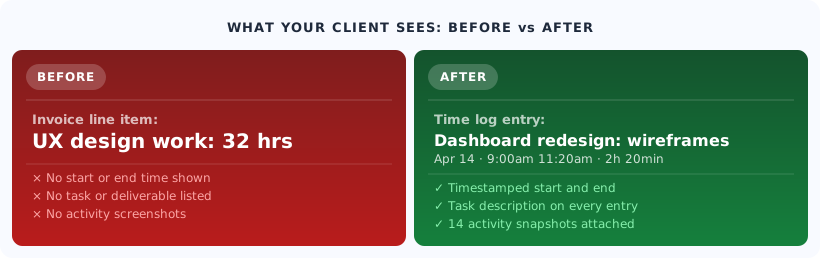
The entries do not need to be literary. They need to be specific enough that a reasonable client, looking at the log two weeks after the work was done, would nod and say "yes, that makes sense."
That is the bar. You are not writing a report. You are creating a reference.
How activity snapshots make the case automatically
For clients who need more than a text log, a 10-minute screenshot interval does something text cannot: it puts visual context next to the timestamp.
This is not surveillance. It is a record you own, that you can share selectively, that shows your work in a way a description cannot match.
When a client disputes 32 hours of design work, being able to say "here is what my screen looked like at 10am, 10:10am, 10:20am" moves the conversation from opinion to observation. Most disputes end right there.
Trakkar's screenshot manager builds this trail without manual effort. The captures are timestamped, tied to the active project, and stored in your account. You share what you want to share.
Paired with Trakkar's time tracking, every entry has a start time, end time, project tag, and an optional activity snapshot attached. When you write your invoice, you are not reconstructing anything from memory. You are generating a document from an existing record.
You do not need to share screenshots with every client. Having them available when a dispute arises is the point. It changes the dynamic from "prove it" to "here it is."
From time log to invoice, without Sunday nights
Most freelance invoice problems are actually Sunday-night problems.
You are billing monthly. The invoice is due Monday. You open your spreadsheet, look at the blank rows for weeks three and four, and start reconstructing hours from memory. You know you worked more than 22 hours on that branding project. It felt closer to 30. But you can only justify what you can document, so you write 22.
That gap, 8 hours at $65 per hour, is $520 you just left in the client's pocket.
The fix is not better memory. It is a daily logging habit that takes three minutes to maintain.
"I used to spend three hours every Sunday reconciling what I thought I worked versus what I could actually prove. Now I just export the report and send the invoice. It takes 15 minutes."
Trakkar's invoice management pulls directly from the time logs you have already kept. No separate data entry. No reconciliation session. The invoice is a summary of your tracked hours, not a new document you have to build from scratch.
If you run three or more retainers, the time savings alone are worth examining. Three hours per month building invoices manually, across 12 months, is 36 hours of unbillable admin work per year. At $65 per hour, that is $2,340 in time spent on paperwork that should take 15 minutes.
A real-feeling example
Priya runs a four-client freelance practice in Bengaluru, focused on UX and product design. Her average monthly invoice is about 28 hours per client.
Before tracking time properly, she would get one invoice dispute every few months. Not aggressive disputes, just "can you clarify this?" emails that took an hour to respond to and usually ended in her rounding down an hour or two to keep the client happy.
Over a year, those rounding decisions cost her roughly 18 hours of billed work. At her rate, just over $1,100.
She started using Trakkar's time tracking with 10-minute screenshots for the two clients who tended to scrutinize invoices. She logged task descriptions as she worked, not at the end of the week.
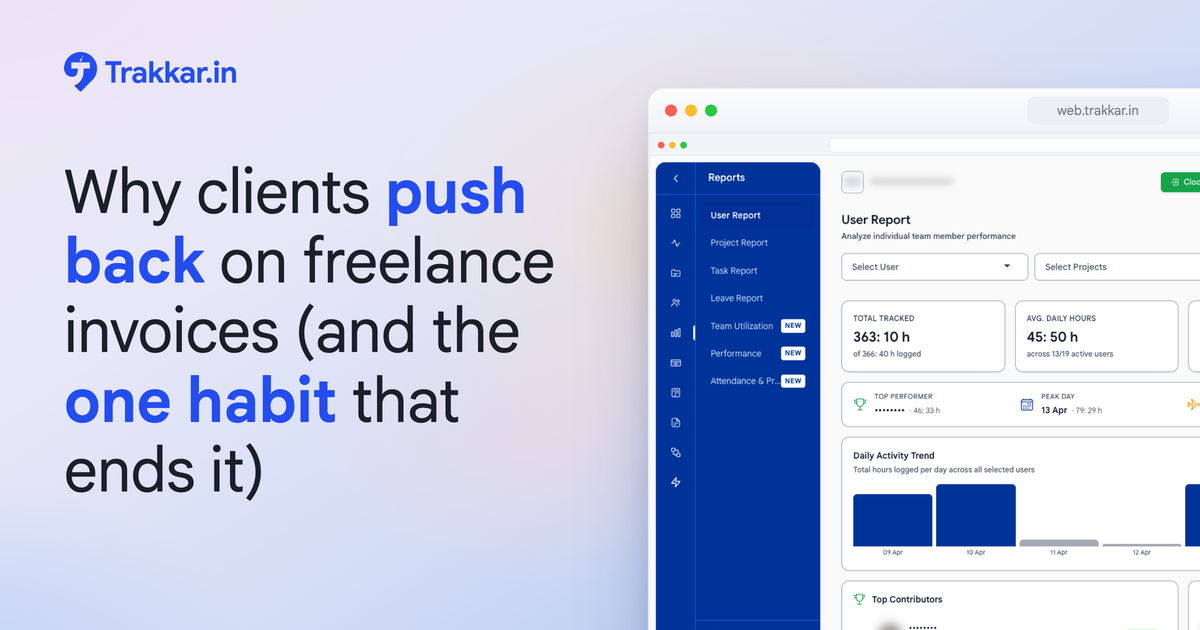
The next time a client questioned an invoice, she sent a link to her hours report. The conversation ended in two messages.
She has not given a discount since.
What to do this week
You do not need to change how you work. You need to change when you log.
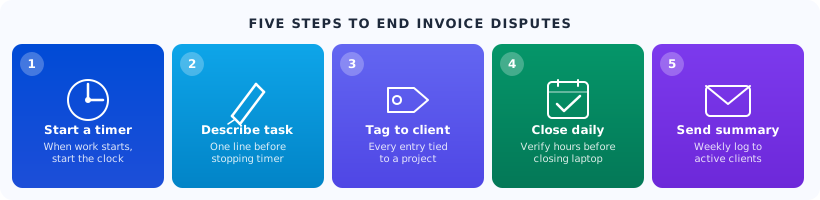
Step 1: Start a timer when you start work. Not after you finish. Not at the end of the day. When you open the file, start the timer. This single habit closes more than half the documentation gap by itself.
Step 2: Add a one-line description before stopping. Ten seconds. "Homepage hero layout: adjusted spacing and added copy placeholder." That is enough. The description written while you are still in the work is ten times more useful than the one you write two days later.
Step 3: Tag every entry to a client and a project. Not a general bucket. If it is Client A work, it is logged under Client A. No co-mingling across retainers.
Step 4: Set a daily close habit. Before you close your laptop, verify that the day's hours are logged. This catches the entries you forgot to stop and the quick tasks you handled off-timer.
Step 5: Send a weekly log summary to clients who ask questions. One-page hours report, delivered Friday. Not as a defense, but as a habit. Clients who see your hours weekly never question the monthly invoice.
The one habit that ends 90% of disputes: log a one-line task description before you stop the timer. Not after. Not at end of day. Before you click stop.
The dispute that never happens
There is a version of your practice where invoice disputes simply stop occurring. Not because every client trusts you completely, but because you have built a system that gives them nothing to dispute.
Timestamped entries. Specific descriptions. An activity trail for clients who want it. An invoice that is generated from a real record, not reconstructed on a Sunday night.
That is not a heavy process. It is three minutes per task and a 15-minute invoice export at the end of the month.
Trakkar is built for exactly this kind of practice. If you run multiple retainer clients and invoice disputes are part of your current reality, see how Trakkar works for freelancers before the next one happens.
Or, if you want to walk through your specific workflow and see where disputes are most likely to come from, book a 20-minute demo. Bring your current logging process. We will show you exactly where the documentation gaps are.