The project went well. The client is happy, the work was good, and the deadline held. Then you open the timesheet summary and find out your team spent 140 hours on a project you priced at 100. You invoice 100. You eat 40.
At $90 per hour average billing rate, that is $3,600 gone. And it probably happened on three other projects this quarter. That is $14,400 in work your team delivered for free, not because the scope changed, but because nobody saw the overrun coming until the work was already done.
The part that stings is that nobody on the team had bad intentions. They worked hard, the project felt manageable, and nobody raised a flag. That is exactly the problem. Without a time budget set before the project starts, there is no flag to raise.
How agencies discover overruns (always at the wrong moment)
Most agencies track time. Very few track time against a budget while the project is running.
Your team logs hours faithfully. The data sits in the timesheet summary until someone pulls a report at invoice time. By then, the work is done. The overrun is locked in. The only question left is whether to eat it, discount it, or have an awkward conversation with the client.
That conversation is brutal when it surprises both parties. The client thinks the project is complete. You are asking for more money after the fact, with no warning. Even when you are right about the scope drift, the timing destroys your position.
The issue is not the time tracking. It is that time tracking without a budget is just a log. A log tells you what happened. A budget tells you what is coming.
What a time budget actually is (and is not)
A time budget is not a complex project management system. It is three numbers, set once, before work starts.
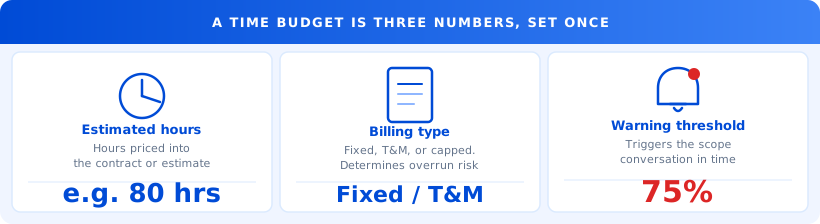
Estimated hours. How many hours did you price this project at? If you priced at a fixed fee, reverse-calculate. If your team spends 100 hours at $80 per hour average cost and you bill a $12,000 flat fee, your implied time budget is 150 hours at that margin. Know that number.
Billing type. Fixed price, time-and-materials, or capped T&M. The type determines how urgent the budget watch is. Fixed price means every hour over budget comes directly out of your margin.
The conversation threshold. This is the number that triggers action. For most agencies, it should be 75 to 80 percent of estimated hours. When a project hits that point, one specific person has a conversation. Not a confrontation. A conversation.
That is it. No Gantt chart required.
The math on ignoring it
Industry data from project management research consistently shows that knowledge-work projects run 20 to 40 percent over their initial time estimates. For agencies specifically, post-project audits find that fixed-price projects absorb an average of 23 percent more hours than the original estimate, with no corresponding revenue increase.
Run that against a real agency. A 10-person shop running five active fixed-price retainers, each priced at 80 hours per month:
Five projects at 80 hours at $90 per hour billing rate equals $36,000 in monthly revenue from those five clients. At 23 percent overrun: five projects times 18.4 extra hours times $90 equals $8,280 in time delivered and never billed. Annually: $99,360.
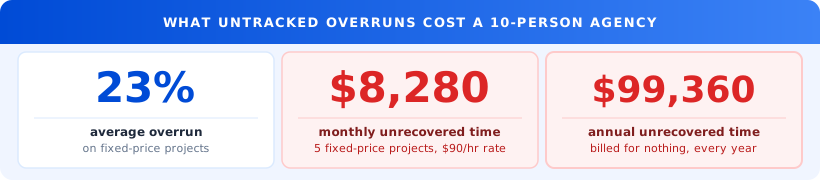
That is nearly $100,000 in work your team does every year that generates no revenue. For a 10-person shop, that is the difference between a profitable year and a flat one.
And the $99K figure is conservative. It does not include the opportunity cost of those hours. What else your team could have taken on if those projects were scoped and tracked properly is a number you will never know.
If you have not run this calculation for your own portfolio: take your five busiest fixed-price projects, estimate how many hours actually went in versus what was budgeted, and multiply the gap by your average billing rate. Most agency founders who do this for the first time are surprised within 90 seconds.
The 75% conversation
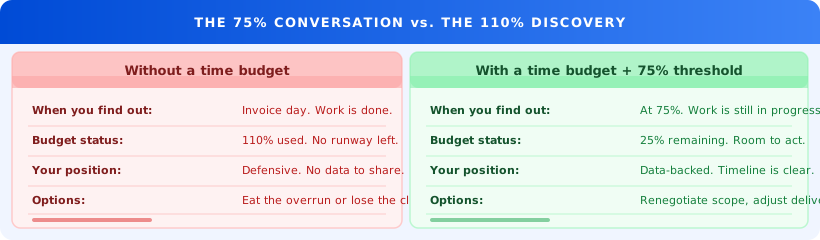
When a project hits 75 percent of its time budget, two things are true.
First, you still have 25 percent of the budget remaining. You have runway. You can adjust scope, negotiate a change order, or at minimum set accurate expectations before the deliverable lands.
Second, you have data. You know exactly where the hours went. You can walk the client through the timeline, explain which tasks ran long, and have a factual conversation rather than a defensive one.
The 75 percent conversation is not: "this project is going over budget." It is: "we have used 60 of our 80 estimated hours, and here is where we stand." That is a project update, not a crisis.
The 110 percent discovery is a crisis. Your team has already delivered. You are asking for more money after the fact. The client's first question is why you did not say something earlier. You have no good answer.
One operations lead at a 14-person content agency described it this way: "We thought scope creep was a client behavior problem. It turned out to be a visibility problem. The clients were not expanding scope without asking. We just were not connecting the expanded requests to the budget until it was too late."
"We thought scope creep was a client behavior problem. It turned out to be a visibility problem."
How real-time budget tracking changes the conversation
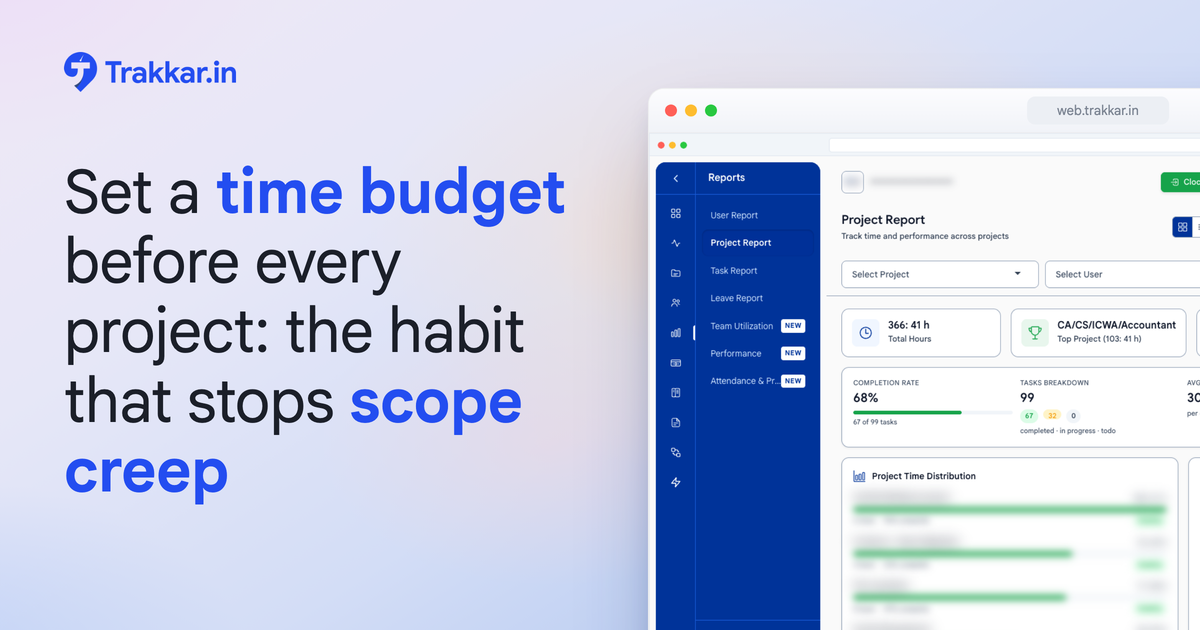
When each project has a time budget set before work starts, your reports and analytics dashboard shows hours burned against that budget as it happens. You see a project at 48 out of 80 hours mid-month. You know you have 32 hours left before the threshold.
More useful: you can see burn rate by week. A project that used 20 hours in week one and 28 in week two is accelerating. At that rate, you will hit 80 hours before the month ends. You know that now, not on invoice day.
The task and project management layer connects each logged hour to a specific task, so you can see which pieces of the project are running long. Is the extra time going into client revisions? Into a task that was scoped too thinly? Into a dependency that blocked everything else? That data changes the conversation you have, whether internally or with the client.
This is what time tracking looks like when it connects to a budget: not a log of what happened, but a running indicator of where you are headed.
For agencies running five or more simultaneous projects, the portfolio view is where this pays off the most. A single weekly check of budget burn across all active projects takes five minutes and tells you which ones need attention this week.
The most common agency reaction after seeing live budget burn data for the first time: "I knew we were over on Project X. I didn't know it was already 90 percent." The number itself is rarely the surprise. The timing is.
What a real team found
A 12-person digital strategy agency was running eight monthly retainers, six of them fixed-price. They had no time budgets set per project. They tracked time accurately. Every month, they discovered two or three projects had run over their implied estimates. They absorbed the overruns as cost of doing business.
Their best project manager estimated they were eating 15 to 20 hours per month in unbudgeted overruns across the portfolio. At their blended internal cost rate of $70 per hour, that was $1,050 to $1,400 per month in unrecovered time. Nearly $15,000 per year.
They set project time budgets and added a 75 percent alert. Within 90 days, two things changed.
First, they caught three projects before they crossed their thresholds. In two cases, they renegotiated scope with the client. In one, they identified an internal process inefficiency and fixed it before it became an overrun. None of those three became invoicing problems.
Second, their project scoping conversations with new clients became more concrete. Because they now had real data on how long specific task types actually took, their estimates got tighter. Their fixed-price bids stopped being optimistic guesses built on the previous PM's memory.
What to do this week
You do not need a system overhaul. Five concrete steps across three days:
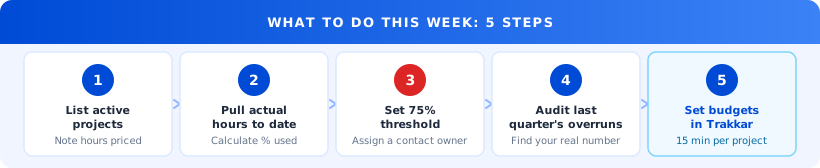
Day 1: List your five busiest active projects. For each one, write down the estimated hours or the implied hours based on your fixed price. If you do not know the implied hours, calculate them: fixed fee divided by your average hourly cost. This number exists. You just have not put it next to the actual time log yet.
Day 2: Pull actual hours for each project, month-to-date. For each project, calculate the percentage of estimated hours already used. At least one project will surprise you. That is your starting point.
Day 3: Set a 75 percent threshold for each project. The next time any project hits 75 percent of estimated hours, one specific person is responsible for making contact, whether with the client or with the internal team lead. Write the name down. Ambiguity about who owns the conversation is why the conversation never happens.
Day 4: Do the math on last quarter's overruns. How many hours did your team deliver that did not map to revenue? Multiply by your average billing rate. That is the number you are working to recover.
Day 5: Set up budget tracking for all active projects. Each project gets three fields: estimated hours, billing type, and warning threshold. This takes about 15 minutes per project. The return on that time starts in week two.
Start with your five biggest active projects, not your whole portfolio. A five-project budget setup takes under two hours and gives you a live burn view by Monday. Doing all thirty projects at once takes a week and usually does not happen.
One concrete next step
If you want to see what budget burn looks like across your active projects right now, Trakkar's project tracking and analytics gives you a live view: hours burned, budget remaining, and which team members are driving the cost.
If you'd rather start with a conversation, book a 20-minute demo. Bring your last three project invoices. We will show you the gap between what you billed and what was actually worked in the first ten minutes.