You installed employee monitoring software three months ago. Your ops metrics looked better on paper. Your managers felt less anxious. Then your two best developers gave notice in the same week.
Both said the same thing in their exit interviews: they did not feel trusted.
This is not a hypothetical. A 2025 study from the National Bureau of Economic Research tracked the output of knowledge workers under different monitoring regimes. Unjustified digital surveillance, the kind workers cannot see or access themselves, reduced team output by 17%. Not morale scores. Not engagement survey numbers. Actual measurable work output.
For a 10-person agency billing $80 per hour across a 40-hour week, 17% of output is $5,440 per week in delivered work. That is what invasive monitoring costs you, not saves you.
Why the instinct to monitor makes sense (and where it goes wrong)
The ops leads who install screenshot tools are not villains. They are managers facing a real problem: their distributed team is invisible, and the natural visibility that came from shared office space now requires a deliberate system.
The instinct is correct. The implementation is often wrong.
There is a meaningful difference between a system that watches your team to catch unproductive behavior and one that builds a work trail your team can actually use. Most of the tools deployed in remote and hybrid teams are the first kind. They take screenshots every minute. They log keystrokes. They flag idle time. They generate manager-facing reports that employees cannot see.
That is not a visibility system. It is a surveillance system. And the data on surveillance is increasingly clear.
The numbers every ops lead managing remote teams needs to see
The 17% output reduction from the NBER study is not a soft metric. Researchers measured actual work product across multiple organizations and control groups. Teams under invasive monitoring delivered 17% less output than comparable teams that were not monitored in the same way.
The explanation is psychological. Being watched shifts cognitive resources from the task to impression management. Instead of solving the problem, part of the brain is managing how the work looks on screen. Your fastest writer starts making sure she is always typing. Your most creative developer starts opening browser windows that look like research.
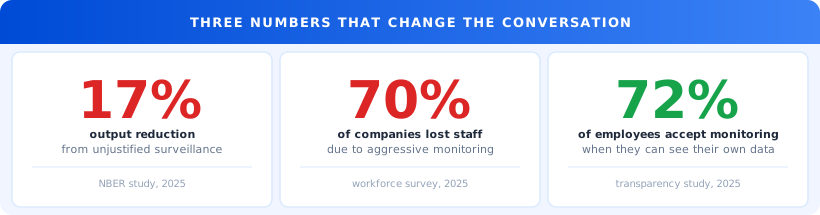
Beyond individual output, the talent math is brutal. In surveys of companies that implemented aggressive remote monitoring, nearly 70% reported losing employees because of the monitoring. Thirty-five percent lost six or more people.
Hiring a single mid-level developer costs between $20,000 and $40,000 in recruiting, onboarding, and productivity ramp. Losing three people to monitoring-related resignations costs $60,000 to $120,000 in replacement expense. That is what you spent to gain visibility on a team that was probably working fine to begin with.
Before expanding any monitoring system: calculate the cost of one full recruiting and onboarding cycle, then ask whether a 10% increase in attrition would exceed what the monitoring saves. For most teams at 10 to 20 people, it does.
The trust gap is real, but surveillance is not the fix
There is a genuine problem underneath the monitoring instinct.
85% of business leaders say they struggle to trust that remote employees are productive. 87% of those same employees say they are. That gap is the real problem. Surveillance does not close it. It hardens both sides.
The manager who installs monitoring software and sees that an employee's screen was idle for 20 minutes at 2pm learns nothing useful. Was she thinking through a complex problem? On a client call? Getting coffee? The data looks like slacking. It might be the opposite.
The employee who knows she is being watched at 2pm and is genuinely thinking through a hard problem starts opening a browser window that looks like research. The screen is no longer idle. The manager's anxiety is soothed. The employee is less productive because she is managing optics instead of doing the thinking.
You have not fixed the trust gap. Both parties have gotten better at performing for the system.
"We turned off continuous monitoring and replaced it with 15-minute snapshots our team can see themselves. Attrition dropped. The people who stayed said they finally felt like adults."
What monitoring looks like when it actually works
72% of employees say they accept monitoring when two conditions are met: it is transparent, and they can access their own data.
Those two conditions change what monitoring fundamentally is. When employees can see their own activity trail, monitoring becomes self-documentation rather than surveillance. The snapshot at 2pm is not a report filed against the employee. It is a reference they can use when writing their time log description. "That's when I was working through the API authentication issue. It took longer than I expected."
Frequency matters too. A screenshot every minute is surveillance. A snapshot every 10 to 20 minutes is a reference trail. The value for documentation purposes is similar. The psychological cost is completely different.
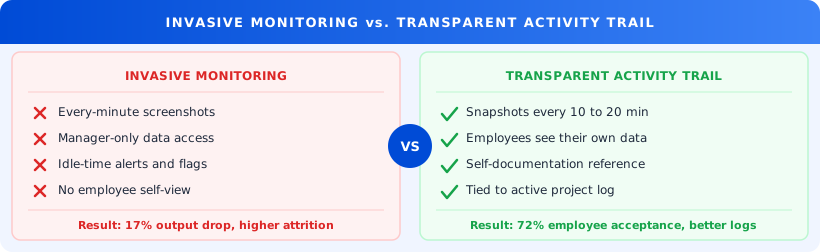
The difference between these two approaches is not a minor policy tweak. It is the difference between a system your team uses and a system your team resents.
How Trakkar's activity snapshots work in practice
Trakkar's screenshot manager takes periodic activity snapshots at an interval the team sets, typically every 10 to 20 minutes. Every team member can see their own snapshots in their own account. The data is tied to the active project and time entry, so it works as a reference for time log descriptions rather than as a management report.
What this gives your team:
A self-documentation tool. When a team member finishes a focused session and needs to describe what she worked on, the snapshots give her a visual record to reference. Time log descriptions become more accurate without adding any extra work.
Proof of work when it matters. For client-facing teams, a timestamped activity trail removes the "did you really spend 12 hours on this?" conversation. The record is already there. The team member shares what is relevant.
Capacity signals without the paranoia. Managers reviewing the team productivity dashboard see patterns over time: who is active, when output drops, where effort is going. That is useful information. It does not require watching every keystroke to get it.
Paired with Trakkar's time tracking, each time entry has a project tag, a timestamp, and an optional activity snapshot attached. When the invoice goes out at the end of the month, the documentation is already built. No reconstruction required.
A real-feeling example
A 16-person product agency had been running monitoring software that captured screenshots every two minutes. They installed it after two project deadlines were missed and a client questioned where the billed hours had gone.
The screenshots did not solve the deadline problem. They created a new one. Two senior engineers said in quarterly reviews that the monitoring made them uncomfortable working. A third left for a competitor, citing what she described as a surveillance culture.
The ops lead switched to 15-minute snapshots with employee-visible data. She also added a weekly project hours report that both managers and team members could access and review.
Within 60 days, the two remaining senior engineers said the system felt different. "It's more like a work log than someone watching over my shoulder," one said.
The deadline problem was resolved separately, with better project scoping. But the monitoring change removed a source of friction that had been slowing the team's best people down for six months.
What to do this week
You do not need to dismantle your monitoring setup. You need to evaluate whether it is the kind that helps or the kind that harms.
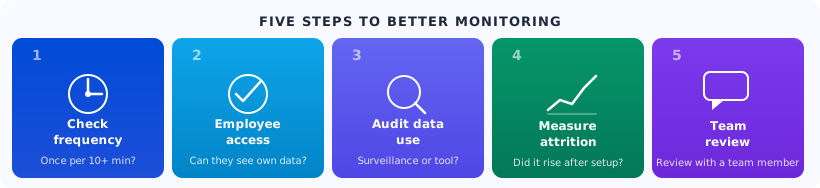
Step 1: Check your screenshot frequency. If your current tool captures more than once every 10 minutes, you are in surveillance territory. Reduce the interval. The value for time documentation is the same. The psychological cost drops significantly.
Step 2: Find out whether your team can see their own data. Ask one team member to pull their own activity screenshots from last week. If they cannot, your monitoring is one-directional. That is exactly the condition employees resent. Fix it before they tell you in an exit interview.
Step 3: Check how your managers are using the data. If screenshots are reviewed daily for signs of idleness, the system has become surveillance. If they are referenced occasionally to help someone document their time, it is a work trail. The use case defines the culture.
Step 4: Measure attrition against when monitoring started. If the timing correlates, you have your answer. If attrition is flat, the current system may not be creating the problem, though it may still benefit from a transparency upgrade.
Step 5: Review one team member's activity report with them. Walk through last week's snapshots together on a call. Their reaction will tell you more about what the system is doing to your culture than any metric will.
A useful test before expanding any monitoring: "Would I be comfortable if my team could see exactly how I use this data?" If not, your monitoring is surveillance. If yes, it might be a work trail.
The monitoring your team actually wants
There is a version of remote team visibility your team welcomes. It gives them a record of their own work. It makes time logging and invoicing faster. It lets them prove what they did without reconstructing a week from memory.
That version does not require constant screenshots. It requires transparency, the right interval, and employee access to their own data.
Trakkar's screenshot manager is built for teams where visibility matters but surveillance is not the answer. If you want to see what that looks like for your specific team setup, book a 20-minute demo. Bring your current monitoring approach. We will show you what a transparent, team-accessible activity trail looks like in the first ten minutes.