One plan, everything included·Team $5/user/month·Business on custom pricing
Project profitability · India

Trakkar logo

Project Profitability Tracking Software for Service Businesses

Trakkar shows what each client project is costing you while the work is still going on. Set an hourly cost for each person and track time against projects. The Profitability report then shows cost to date against each project's value. Hours, tasks and invoicing sit in the same tool, so you see the margin before the invoice goes out.

₹120/user/month + GST

Trakkar costs ₹120 per user per month plus GST, billed in INR.

What project profitability tracking shows for every project

Agencies often find out a project lost money after it closes. By then the hours are spent. Trakkar keeps the numbers current, because the project report reads from the work your team logs every day.

In the reports shown on this page, you can see for each project:

  • Hours logged in the dates you pick.
  • Margin health. The Project margins table gives each project a badge based on its margin: On track, Margin thin, Loss or No value set.
  • Cost to date against project value in the Profitability report.

In Trakkar, a project ties together its tasks, tracked hours, team, client and payments. Open the report and it is already up to date. Nothing to export, nothing to rebuild in a spreadsheet.

How Trakkar works out project cost

The idea is simple. Every hour your team spends on a project has a cost.

  1. Set rates. Add an hourly cost for each person, and a project rate where it differs.
  2. Track time against projects and tasks. Your team uses the desktop tracker, or logs manual entries with notes.
  3. Approve time corrections. Managers approve corrections in the Requests queue, so the hours on record are the right ones.
  4. Read the report. The Profitability report shows cost to date against each project's value. The numbers move as the work happens.
Trakkar Project margins with sample data: a margin by project chart and a health donut showing On track, Margin thin, Loss and No value set

Accurate hours, so the numbers hold up

A profitability report is only as good as the hours behind it. If people rebuild their timesheets from memory on Friday, the margin you see is a guess.

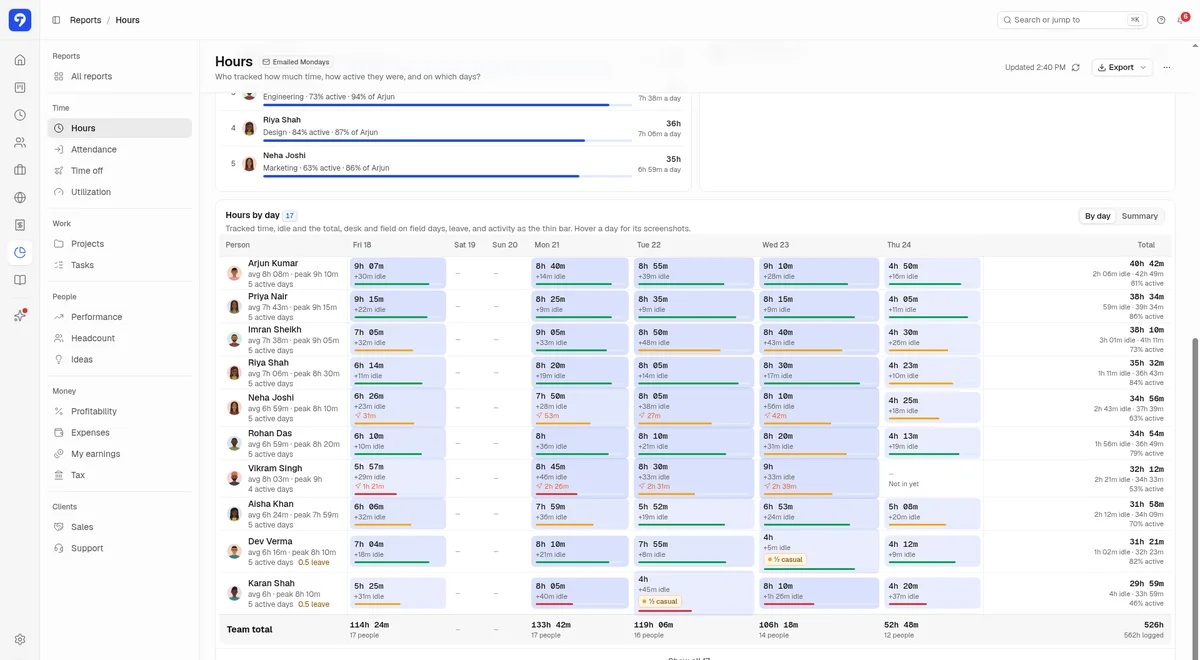
Trakkar's desktop app tracks time automatically on Windows, macOS and Linux and flags idle minutes. When work happens away from the tracker, people submit a manual entry and a manager approves it. You can also mark projects or tasks as non-billable. Internal rework then stays visible in your costs without inflating client totals.

Learn more about desktop time tracking with Trakkar.

Trakkar Reports, Hours by day view with sample data: tracked time and idle time per person for each day of the week, with half-day leave marked and weekly totals

Reports for the whole team

Project margin is one view. Trakkar also includes:

  • Utilization with bench time, so you can see who is under loaded and who is stretched.
  • Member workload across projects.
  • Per user and task reports that read live from the same records.
  • Timesheets by person, project and day, ready to export.

Watch a short walkthrough of projects and reports or reports and analytics.

Invoicing in the same tool

Invoicing comes in the same plan. You create invoices and quotations with GST and GSTIN for Indian businesses. Quotations convert to invoices in one step, and you can track partial payments, TDS and receivables. Since projects, hours and invoices live together, you can check a project's margin before you bill the client.

Who it is for

We built Trakkar for service businesses and agencies in India that sell time and expertise:

  • Digital, design and marketing agencies on retainers or fixed projects.
  • Software and IT services teams working on client builds.
  • Consultancies and professional firms that bill by the hour.

If you run client work and want time tracking, projects, attendance and invoicing in one tool priced in rupees, Trakkar fits. If all you need is an accounting ledger, a dedicated accounting tool will suit you better.

Comparing options? See all Trakkar comparisons.

Pricing

  • Team: ₹120 per user per month plus GST, billed monthly in INR. Includes time tracking, projects, reports, attendance, leave, invoicing and a client portal.
  • Business: custom pricing for larger rollouts.

See full details on the pricing page.

Trust

Trusted by growing teams

More

Related pages

Other high-intent guides for Indian teams.

Frequently asked questions

It means watching what a project costs you against what it is worth, while the work is still going on. In Trakkar, tracked hours and each person's hourly cost give you cost to date for every project.

Know which projects pay

See cost, hours and margin for every client project in one place, priced in rupees.

Start Free TrialBook a demo
No credit card required. Cancel anytime.